The previous checkpoint in this learning journey established the direction of the MYT Governance Lab.
The earlier Power Platform Center of Excellence work helped create a curated governance view across makers, apps, flows, environments, ownership, and platform activity. It showed how governance visibility can emerge through dashboards, sync behavior, inventory, and interpretation.
The next step is to understand how those same governance questions now appear inside the native Power Platform administration experience.
Microsoft’s current documentation notes that the Power Platform CoE Starter Kit is no longer actively maintained, and that core CoE toolkit scenarios now map to Power Platform admin center capabilities. 1
That shift matters.
It does not mean the CoE concept disappears. It means the governance & the administration of it, the work, moves closer to the platform itself.
______________________________________________________________________________________________________________________
This checkpoint is not about showing off a finished application. It is not about pretending a test flow is a full production workflow.
It is about something more foundational:
Can a Power Platform asset be seen, inspected, accounted for, and understood from a governance & oversight perspective?
That question matters because modern Microsoft environments are no longer made up only of documents, spreadsheets, emails, and project schedules.
Work increasingly moves through:
•Apps
•Flows
•Approvals
•Dataverse records
•dashboards
•Connectors
•Environments
•Identities
•Agents
•Security roles
•Administrative policies
So governance/oversight cannot only ask: Did someone build something?
It also has to ask:
“Who owns it?”
“Where does it live?”
“What does it touch?”
“Is it being used?”
“What environment controls surround it?”
“Should it be maintained, promoted, monitored, documented, or retired?”
That is the purpose of this artifact.
It maps CoE-style visibility into native Power Platform administration.
______________________________________________________________________________________________________________________
The Mock Operating Model
To keep the lab practical, I am using a small fictional operating model inside the MYT environment.
The names and assets are simple, but the governance pattern is realistic.
| Person / identity | Mock role | Business function |
| Vanan Nages | PMO / Governance Lead (or Team Lead) | Oversees the lab, governance interpretation, reporting, and control model |
| Sarah Chen | Supply Chain / Vendor Lead | Represents vendor readiness, supply coordination, procurement activity, and supplier follow-up |
| Arjun Nair | Operations / Deployment Lead | Represents site readiness, operational handoffs, rollout activity, and execution support |
| James Patel | Finance / Controls Lead | Represents invoice review, budget control, approval routing, and audit evidence |
The point is not that these accounts are complex.
The point is that governance becomes easier to understand when users represent real responsibilities.
A maker is not just a maker
A maker may be someone building or owning part of how work moves through the organization.
______________________________________________________________________________________________________________________
The Lab Flows
Inside the MYT-CoE-DEV sandbox, the current lab includes several simple Power Automate cloud flows:
| Flow | Plain-Language meaning | Governance lesson |
| DEV – Intake Flow | A request enters the system | Work begins somewhere; intake needs traceability |
| DEV – Intake Routing | A request is directed to the right owner or team | Routing logic becomes part of the operating model |
| DEV – Health Check | A process checks status or readiness | Automation can support monitoring |
| DEV – Weekly Summary | Activity is summarized for review | Reporting cadence supports oversight |
| DEV – Automation Check | A simple validation or test flow | Admins need ways to confirm automation exists and behaves |
These are intentionally simple lab assets. Their purpose is not to demonstrate a finished production solution.
Their purpose is to show how Power Platform assets can be inventoried, inspected, and understood through a governance/oversight lens.
______________________________________________________________________________________________________________________
The Governance/Oversight Inspection Path
For this checkpoint, I used DEV – Intake Routing as the selected asset.
The inspection path followed six basic questions:
| Step | Governance question |
| Inventory | What exists? |
| Overview | Who owns it, where does it live, and what type of asset is it? |
| Connectors | What does it touch or depend on? |
| Usage | Is it active, running, or being used? |
| Power Automate run history | Did it actually run? |
| Environment | What boundary and controls surround it? |
This is the backbone of the artifact.
It turns a test flow into a governance object.
______________________________________________________________________________________________________________________
From CoE Dashboard to Native Inventory
The earlier CoE dashboard provided a curated governance lens.
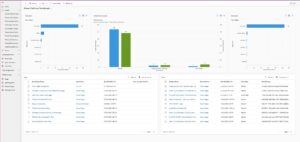
Figure 1 — CoE dashboard view
The CoE dashboard provides a curated governance lens across makers, apps, flows, environments, ownership, and platform inventory.
It helped show:
• Makers
• Apps
• Flows
• Environments
• Owners
• Modified dates
• Flow states
• Inventory patterns
In plain language, the CoE dashboard helped answer:
What exists, who owns it, and where does it live?
That was an important foundation.
But in the Power Platform Admin Center, the governance view becomes more native and item-specific.
The Power Platform Admin Center is Microsoft’s unified portal for administrators to manage environments and settings across Power Apps, Power Automate, Power Pages, Microsoft Copilot Studio, and some Dynamics 365 apps.
______________________________________________________________________________________________________________________
In the MYT lab, the Maker Inventory view shows actual platform assets across the environments being managed.
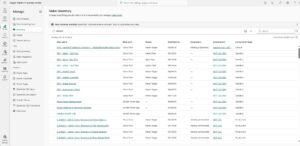
Figure 2 — Power Platform Admin Center inventory
The native inventory view exposes Power Platform assets at the item level, including type, owner, modified date, environment, and environment type.
This includes fields such as:
• Item name
• Item type
• Owner
• Modified date
• Connectors
• Environment
• Environment type
This is the first major shift:
The CoE dashboard summarized the estate.
The Power Platform Admin Center exposes the estate at the item level.
That matters because governance eventually has to move from high-level visibility into asset-level accountability.
______________________________________________________________________________________________________________________
Inspecting the Flow: Overview
The Overview tab for DEV – Intake Routing showed the basic administrative record for the flow.
It identified:
• The item name
• The owner
• The item type
• The item ID
• The item URL
• Who created it
• When it was created
• When it was updated
• The environment it belongs to
• The environment type
• The region
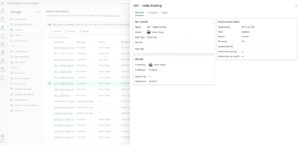
Figure 3 — DEV – Intake Routing overview
The overview panel shows the selected flow as an accountable platform asset, with ownership, activity, and environment context.
This changes the way the asset is understood.
In a maker context, the statement might be:
“I built a flow.”
In a governance/oversight context, the statement becomes:
“I can administratively account for this flow inside the platform.”
That is the governance leap.
A flow is no longer just something that exists in a maker’s workspace.
It becomes an identifiable platform asset with ownership, location, activity history, and environmental context.
______________________________________________________________________________________________________________________
Connectors as Dependency Visibility
The next tab reviewed was Connectors.
For DEV – Intake Routing, no connectors were listed at the time of review.
The page indicated that connectors would appear once the item uses them.
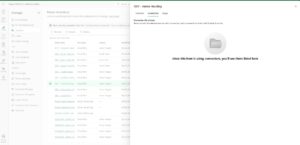
Figure 4 — Connectors tab
The connectors view shows where service dependencies would appear, helping administrators understand what systems an asset touches.
That absence is still useful.
The governance purpose of the tab is clear:
What does this asset touch?
That question matters because once a flow connects to Outlook, SharePoint, Teams, Dataverse, approvals, APIs, or external systems, it is no longer only automation.
It becomes part of the organization’s operating fabric.
Connector visibility can help administrators understand:
• Data movement
• Integration dependencies
• Business process reliance
• Possible security exposure
• Operational impact
• Troubleshooting scope
Microsoft’s Power Platform inventory documentation describes connector inventory as supporting admin workflows such as identifying resources affected by deprecated connectors, tracking premium connector adoption, scoping DLP policies to usage patterns, and reviewing a resource’s connector footprint during troubleshooting.
That is why connectors matter.
Connector visibility is dependency visibility.
Dependency visibility is governance.
______________________________________________________________________________________________________________________
Usage as Activity Visibility
The next tab reviewed was Usage.
For DEV – Intake Routing, the Usage tab initially did not show active usage metrics for the selected period.
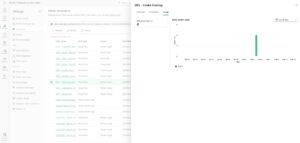
Figure 5 — Usage tab
The usage view shows activity visibility for the selected flow, including total active runs and daily run activity within the selected period.
After the flow was run and the admin-center view updated, the Usage tab later displayed activity, including 4 total active runs within the selected 28-day window.
This is an important governance signal.
The Usage tab answers:
Is this asset active, running, or being used?
In this case, the updated view shows that the flow was not only present in inventory, but had also recorded usage activity.
That creates a stronger practical governance/oversight question:
Is this asset still relevant, and what should happen next?
Active, inactive, or low-usage assets all matter because they may represent:
• Active business logic
• Abandoned tests
• Incomplete prototypes
• Dormant business logic
• Future work
• Stale ownership
• Cleanup candidates
• Documentation gaps
Governance is not only about monitoring highly active systems. It is also about understanding what exists, whether it is being used, and what should happen next.
An asset may need to be documented, monitored, secured, promoted, retired, transferred, or simply left in place as part of the lab. The important point is that the asset can be reviewed.
______________________________________________________________________________________________________________________
Run History vs. Admin Usage Visibility
After reviewing the Usage tab, I ran DEV – Intake Routing directly in Power Automate.
The Power Automate view showed successful recent runs.
That created an important distinction.
Power Automate showed immediate operational evidence:
• The flow was on
• The flow could run
• The run succeeded
• Run history was visible
• Execution duration was visible
But the Power Platform Admin Center Usage tab did not immediately show those usage metrics.
That distinction matters.
Power Automate provides operational run-level evidence.
Power Platform Admin Center provides administrative inventory and usage visibility.
Both are useful.
They are just not the same surface.
A complete governance review may require both.
The maker or operator may need Power Automate to confirm whether a flow actually ran.
The administrator may use Power Platform Admin Center to understand where that flow lives, who owns it, whether dependencies are visible, and what environment controls surround it.
That is an important real-world learning.
Governance/oversight visibility has layers.
______________________________________________________________________________________________________________________
Environment as Governance Boundary
After inspecting the asset, the next step was to inspect the environment.
DEV – Intake Routing lives inside:
MYT-CoE-DEV
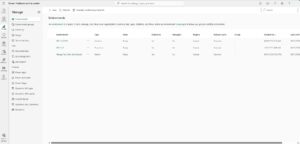
Figure 6 — Environment view
The environment view shows the governance boundary around the asset, including access, resources, managed environment status, and administrative controls.
The environment view showed the governance context around the assets in that workspace.
This included:
• Environment type
• Region
• State
• Security group assignment
• Auditing status
• Managed environment status
• Resources
• Access areas
• Users
• Security roles
• Agents
• Business units
• Generative AI feature settings
• Recent environment operations
This is where the governance/oversight review moves from the individual asset to the container around it.
A flow does not exist by itself.
It exists inside an environment.
And that environment defines the administrative boundary around the assets, users, data, resources, and controls inside it.
Microsoft describes Managed Environments as premium Power Platform capabilities that help admins manage Power Platform at scale with more control, less effort, and more insights.
In the MYT lab, reviewing the environment made the governance model more concrete. Inventory tells us what exists. The environment tells us the control boundary it exists inside.
______________________________________________________________________________________________________________________
What This Proves
This checkpoint proves something modest but important.
It does not prove that the lab is a finished production governance model.
It does not claim that every control has been configured.
It does not try to cover every Power Platform administration capability.
What it proves is this:
MYT can move from dashboard-level visibility into native asset-level governance inspection.
That means a Power Platform asset can be reviewed through several governance dimensions:
• Inventory
• Ownership
• Item type
• Environment placement
• Connector dependency
• Usage visibility
• Run evidence
• Environment boundary
• Access context
• Lifecycle considerations
This is the beginning of practical platform governance. Modern governance is not only about seeing that apps and flows exist. It is about understanding who owns them, what work they support, what they touch, whether they are active, and what environment controls surround them.
______________________________________________________________________________________________________________________
Why This Matters Beyond the Lab
In a real organization, apps and flows may support business-critical work.
A supply chain lead may use an app to track vendor readiness.
An operations lead may depend on a flow to route deployment tasks.
A finance lead may use an approval process to review invoices or exceptions.
A PMO lead may rely on dashboards, schedules, RAID logs, and Dataverse records to understand delivery health.
If those assets are not visible, then the work they support becomes harder to govern.
If ownership is unclear, accountability weakens.
If connectors are unknown, dependencies become hidden.
If usage is not understood, stale assets may accumulate.
If environments are not governed, business processes may grow in uncontrolled places.
That is why this work matters.
Power Platform governance is not only an IT concern.
It is part of how modern work becomes visible, accountable, transferable, and resilient.
______________________________________________________________________________________________________________________
How This Sets Up the Next Artifact
This artifact focuses on the governance environment.
It asks:
What exists?
Who owns it?
Where does it live?
What does it touch?
Is it being used?
What boundary surrounds it?
The next artifact will move further into delivery control.
It will ask:
How does this governed environment support a real project or program?
That is where the PMO layer becomes central.
The same fictional users can become project stakeholders.
The same flows and apps can represent work intake, routing, readiness, approval, reporting, and oversight.
A project schedule can show dependencies, milestones, critical path, ownership, handoffs, and recovery planning. The governance layer and the delivery layer can then be connected. Because modern PMO oversight depends on understanding where work actually lives.
In Microsoft environments, work may live across schedules, apps, flows, Dataverse records, approvals, dashboards, connectors, environments, and identities.
A PMO that cannot understand those surfaces may struggle to govern the work those systems carry.
______________________________________________________________________________________________________________________
Closing Thought
The earlier CoE artifact demonstrated visibility through a curated governance dashboard.
The new Governance Lab moves closer to the native administrative layer, where individual platform assets can be inspected, accounted for, and eventually governed through ownership, environment context, connector dependency, usage, security, and lifecycle controls.
This is the practical bridge from CoE visibility to native governance.
The goal is not simply to build apps or flows.
The goal is to understand how those assets become part of a governed operating environment.
That is where the MYT Governance Lab begins to become real:
not just building the work, but accounting for the systems that carry the work.
______________________________________________________________________________________________________________________
[1] Reference text:
Microsoft Power Platform Center of Excellence (CoE) Starter Kit transition to Power Platform admin center
Updated May 7, 2026.